Quick-service restaurants
Show order numbers at the pickup counter to keep the line moving.

Now preparing. Now ready. No need to ask.
Goopter Smart OSD (Order Status Display) gives customers and staff a clear, real-time view of order progress. Use a tablet, iPad, TV, or compatible monitor as an order status screen that shows each order as it moves from received to preparing to ready. It is ideal for quick-service restaurants, cafés, food courts, takeout operations, and any business where customers need to know when their order is ready.
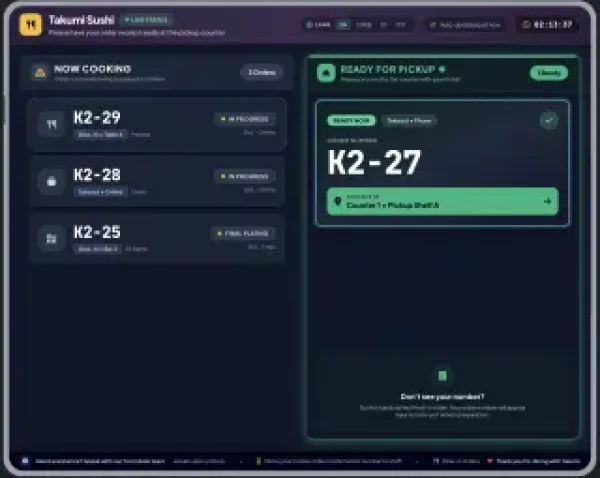
Orders move from received to preparing to ready, in real time.
Use an iPad, tablet, TV, or compatible monitor, based on your space and budget.
Customers check their own order status instead of asking staff.
Status changes as staff process orders on Smart POS or Smart KDS.
Display order progress in real time as orders move from received to preparing to ready.
Choose an iPad, tablet, TV, or compatible monitor based on your available space and budget.
Order status updates automatically as staff process orders within the Goopter POS ecosystem, with no extra steps.
Customers can see their own order status instead of repeatedly asking staff.
Clearly identify completed orders so customers know exactly when to approach the pickup counter.
Greater transparency and less uncertainty during busy periods.
Anywhere customers wait for an order, Smart OSD gives them something better to look at than the kitchen door.
Show order numbers at the pickup counter to keep the line moving.
Let customers relax while they wait instead of hovering at the bar.
Big-screen visibility for busy, noisy environments.
Show when orders are ready so pickup customers are never left guessing.
Specifications for Smart OSD.
An iPad with a 10-inch or larger screen, a TV, or a compatible monitor in landscape orientation. TVs and monitors connect through a mini PC, tablet, or streaming device.
Automatically. As staff accept, prepare, and complete orders on Smart POS or Smart KDS, the OSD updates in real time.
Yes. Smart OSD displays your logo and promotional content alongside the order status columns.
[Confirm multi-display support.]
No. Smart OSD works with Smart POS on its own. Adding Smart KDS lets the kitchen update item readiness directly.
Put Smart OSD on a screen you already have and take the guesswork out of pickup.